Free · one image, no source code

SBOM and known CVEs from your firmware. Free, no call needed.

Upload the image, read the report in the app. No source code.

Upload firmware

Free · one image

Upload firmware, read the report

We send the link to the report to your business e-mail address.

Firmware file

Choose a file or drop it here

BIN, IMG, HEX, AXF, ELF, OUT, TAR, ZIP, TRX, CHK and more, up to 2 GB. No source code.

The upload waits until the NDA is signed. We send it to you by mail.

Report and SBOM within three working days. Servers in Germany; we delete the file after the analysis and the report after 30 days. Privacy (German)

LegacyMind GmbH · Ingolstadt, Germany · HRB 12510 · What happens to your firmware

The first image is free. Whether we check a whole product family afterwards, you decide with the report in hand.

Instant, in your browser, no upload

LocalThe file never leaves your machine.

Drop an AXF and see which libraries in which version are inside.

AXF, ELF or OUT from Keil, IAR or GCC.

Check it yourself: load the page, switch Wi-Fi off, drop the file. The result still comes.

· Rather talk first? Book a call

What applies to the free check

  • Servers in Germany
  • NDA on request before the upload
  • Report and SBOM are yours
  • Report within three working days, deleted after 30 days
  • Passwords and keys appear in the report masked only
  • Encrypted firmware is not decrypted

The report

What you see in the app

Every component with its location, and its version where the file proves it, its known vulnerabilities, credentials and keys in the image, the hardening of every binary. Rule-based, on the file you uploaded.

  • Read

    Components with version, known vulnerabilities per component, credentials, keys and certificates, the hardening of the binaries and unsafe C functions that are linked in.

  • Not part of the analysis

    Runtime and penetration tests, hardware and side-channel analysis, and your processes.

  • Encrypted images

    We do not decrypt an image the manufacturer has encrypted. If a file cannot be read, the report says why.

How the libraries and their versions come out of a Keil build: checking Keil firmware for known vulnerabilities.

Sample report, component vulnerability catalogue (German)
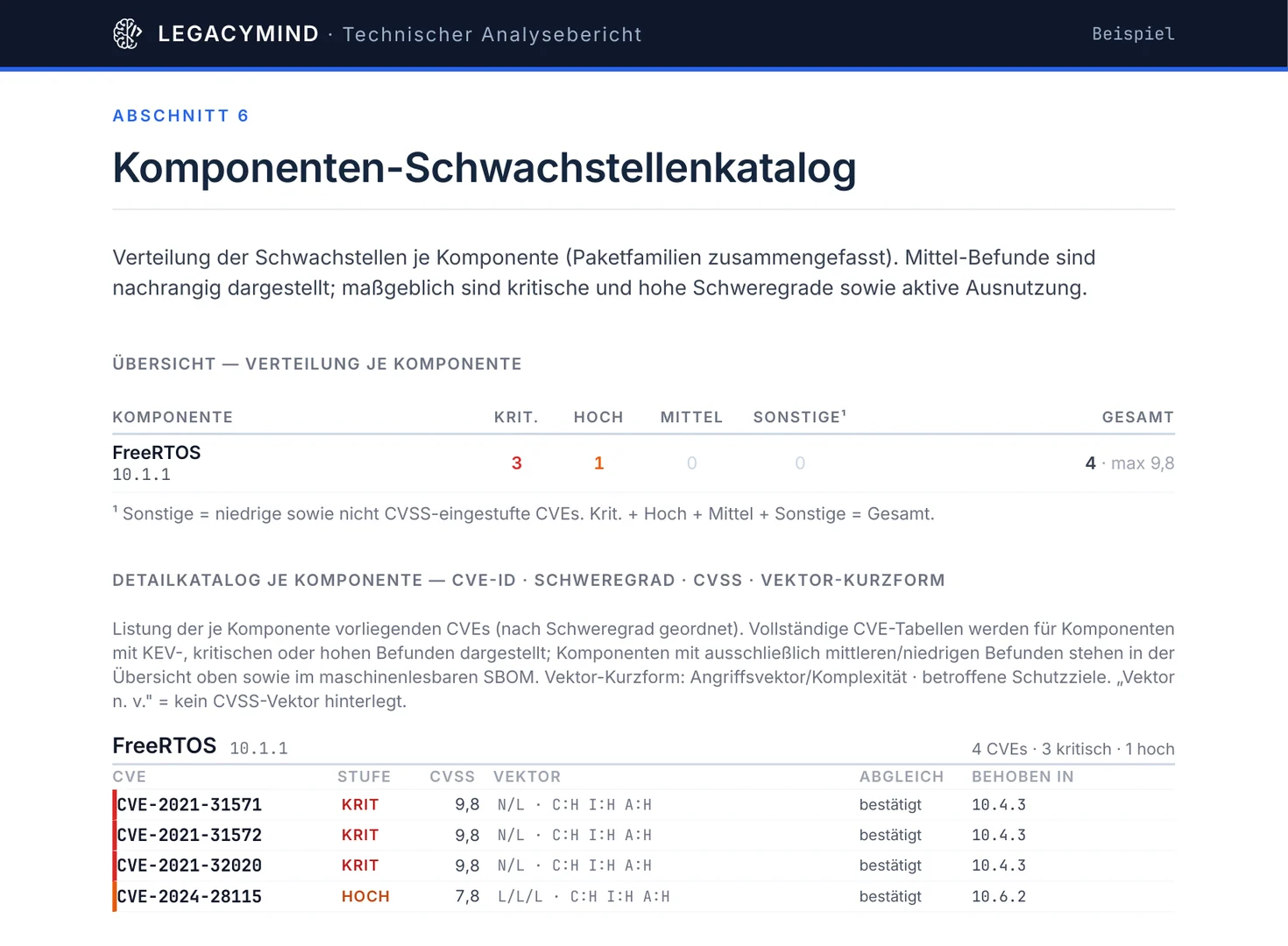
Technical analysis report of a public Keil build (in German), section 6: component vulnerability catalogue for FreeRTOS 10.1.1
Technical analysis report on the public Keil project ble_freertos_amota.axf, exported from the app.

How it runs

Upload, open the link, read the report

  1. 1

    Upload

    Choose the file, enter your business e-mail address, confirm that you may have the firmware checked. No source code, no access to your systems. On request we sign an NDA first.

    Which files

    • .elf .axf .outBare-metal builds (ELF, AXF) · Components, versions, vulnerabilities
    • .hex .ihex .s19 .srec .motIntel HEX and Motorola S-record · Components, as far as the bytes evidence them
    • .binRaw microcontroller images (BIN) · Components, as far as the bytes evidence them
    • .zip .tar .gz .tgz .bz2 …Firmware images with Linux · Components, versions, vulnerabilities
    • .json .xml .spdxSupplier SBOMs · Components, versions, vulnerabilities

    What happens to the file

    • The file goes from your browser straight into our storage in Frankfurt.
    • The analysis runs on servers in Germany.
    • For the matching, only component name and version go to public vulnerability databases, never the file itself.
    • We delete the file after the analysis and the report after 30 days.
  2. 2

    Open the link

    We send a link to your e-mail address. It signs you in to the app and opens your analysis with its progress. You need no password.

  3. 3

    Read the report

    As soon as the analysis is done, the report is in the app and you get a second mail. You download the technical analysis report and the management summary as PDF (German), the SBOM as CycloneDX or SPDX. You make the conformity statement as the manufacturer.

Check it for free

Scope

Which points of CRA Annex I the check answers from the image

The rest are properties of your processes or of the device at runtime. A file does not show them, so the report does not claim them.

With a finding from the image

  • No known exploitable vulnerabilities (Part I, point 2(a))
  • Secure by default configuration: accounts shipped in the image (2(b))
  • Protection from unauthorised access: credentials and keys shipped in the image (2(d))
  • Confidentiality: private keys and certificates in the image (2(e))
  • Exploitation mitigation: stack protection, memory protection, privilege separation (2(k))
  • Identify and document components and vulnerabilities, with an SBOM (Part II, point 1)

Process or runtime, not in the file

  • Development appropriate to the risks (Part I, point 1)
  • Limiting attack surfaces (Part I, point 2(j))
  • Security updates, integrity, data minimisation, availability, impact on other devices, logging, secure deletion (Part I, points 2(c), (f) to (i), (l), (m))
  • Handling, testing, disclosure and distribution of updates (Part II, points 2 to 8)

Questions before the upload

What manufacturers ask first

What does the check cost, and what does it commit us to?
The first image of your company is free and commits you to nothing. You keep the report and the SBOM. Whether we check a whole product family afterwards, you decide with the report in hand.
Why only with a business e-mail address?
The free check is once per company, and we recognise the company by its domain. That is why we do not accept addresses from free mail providers.
Which file should we upload?
The AXF, ELF or OUT of your build, a HEX or BIN, or the image your customer receives. A build with debug information yields the most, because the libraries and versions are recorded there.
Can we use a file from a project that is still in development?
Yes. For the obligations the shipped release counts; for planning the next release a development build helps. On request we sign an NDA before the upload.
What happens to the file?
It goes from your browser straight into our storage in Frankfurt; the analysis runs on servers in Germany. Only component name and version go to public vulnerability databases. You have the report and SBOM within three working days. We delete the file after the analysis and the report after 30 days.
What does the report show for passwords and keys?
How many there are and where they sit, with type and location. The free check shows the value itself masked only; it is not stored in plain text.
What if the image is encrypted?
We do not decrypt an image the manufacturer has encrypted. Upload the unencrypted file from the build. If a file cannot be read, the report says why.
Is the report proof of conformity?
No. It is technical evidence for your technical documentation. You make the conformity statement as the manufacturer.
Are the app and the report in English?
The app, the reports and the terms of the free check are in German. The SBOM is a standard CycloneDX or SPDX file. Questions and the call can be in English.

One image, checked free

Upload one image above: components with versions, known vulnerabilities, credentials. Ben Plannet, CTO, gets back to you personally. Rather talk first? Book 30 minutes (the calendar is in German), write to info@legacymind.de or call +49 176 81152657.